
Maybe the easiest way to connect to Twitter API and to stream tweets, is using Python and Tweepy.
You can install Tweepy using pip:
pip install tweepy
Tweepy is an open source library and you can check the source here. Maybe, take a peak at StreamListener class and see what additional options are available.
‘Nuff said. Here’s the code:
from tweepy import Stream
from tweepy import OAuthHandler
from tweepy.streaming import StreamListener
import json
# https://apps.twitter.com/
#consumer key, consumer secret, access token, access secret.
ckey="INSERT"
csecret="INSERT"
atoken="INSERT"
asecret="INSERT"

# listener class
class listener(StreamListener):

    def on_data(self, data):
        tweet = json.loads(data)
        tweet_text = tweet["text"]
        if tweet["lang"] is not None:
            tweet_lang = tweet["lang"]
        if tweet["geo"] is not None:
            tweet_coordinates = tweet["geo"]["coordinates"]
        tweet_username = tweet["user"]["screen_name"]
        # print username and tweet
        print tweet_username,":", tweet_text

        return(True)

    def on_error(self, status):
        print status

auth = OAuthHandler(ckey, csecret)
auth.set_access_token(atoken, asecret)

GEOBOX_VIENNA = [16.139603,48.087712,16.601715,48.331604]

twitterStream = Stream(auth, listener())
twitterStream.filter(locations=GEOBOX_VIENNA)
This example is streaming tweets from Vienna’s metropolitan area. For selecting your region of interest, check this link for geo-bounding. You also need to register your Twitter App at apps.twitter.com and to insert access keys and tokens.
For extending this example, have a look at Twitter API streaming parameters at this link.
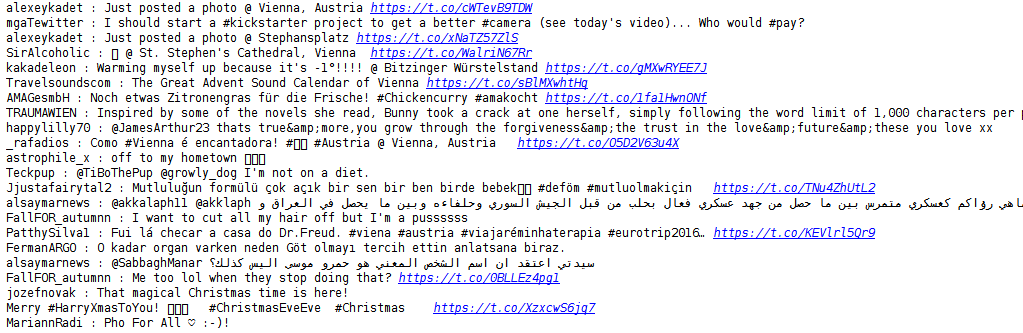
The output looks something like this:
Enjoy the source! Cheers!
 Bits & Notes
Leave a comment